Project Overview
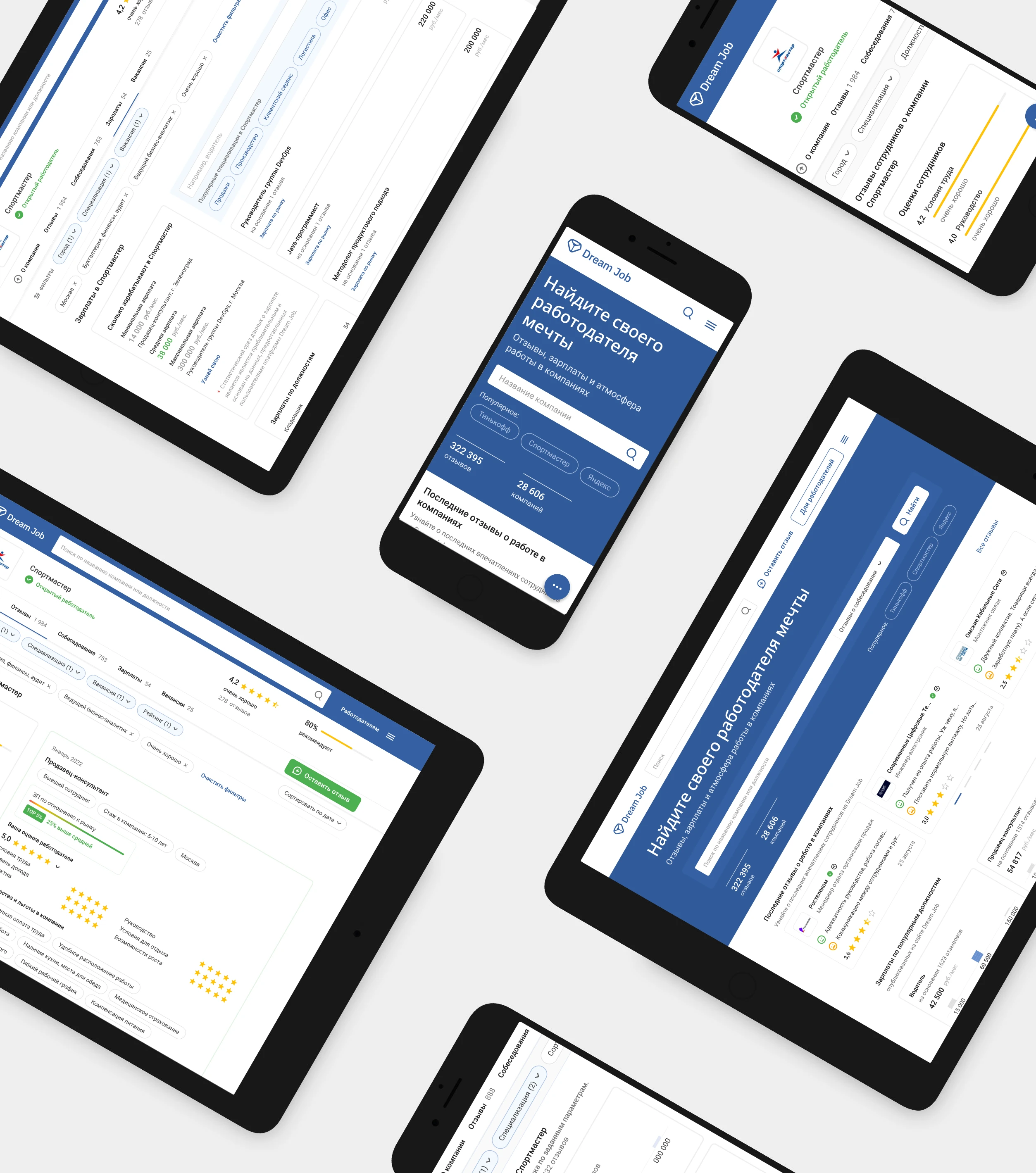
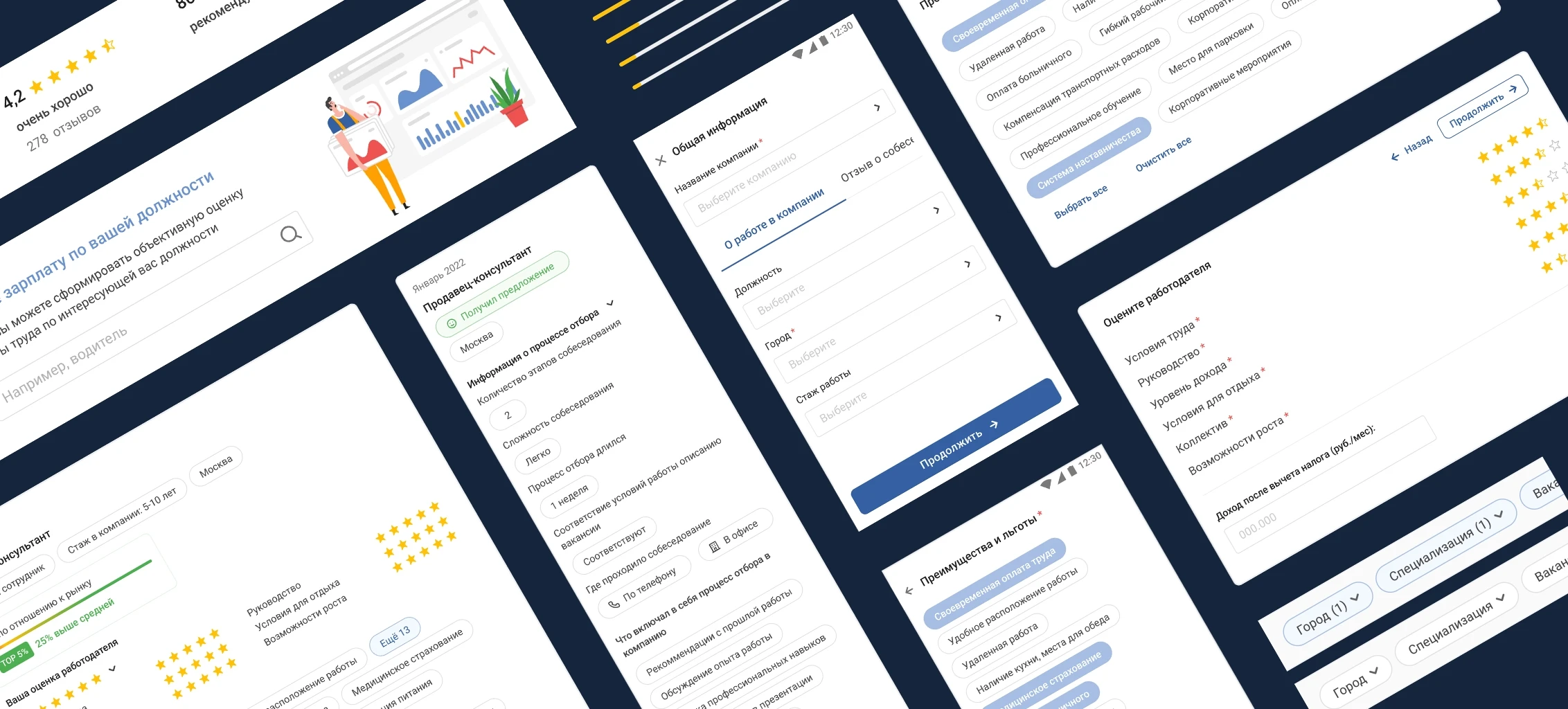
Dream Job is Russia’s largest platform for employee reviews, where individuals can anonymously share their past and present work experiences—including insights into onboarding processes. The platform also allows companies to respond to reviews and provides comprehensive analytics and brand perception insights, helping them attract and retain top talent.
Problem Space

Job seekers lack transparency into company cultures, salaries, and work environments, while employers struggle to understand their reputation and attract the right talent.

Goal

Create a platform that provides authentic employee reviews, salary insights, and employer branding tools to empower informed career decisions and foster workplace transparency.

Challenges

When I joined the team, the MVP had already been launched, but the team was unhappy with the UX/UI and planned to add more features developing the product.

43% of users dropped off during the review submission process.

Most users rated employers without leaving detailed reviews or offered generic feedback, lacking meaningful insights into company culture, strengths, and weaknesses.

Users accused the platform of bias and left negative reviews after their submissions failed moderation.

My Responsibilities

Led design strategy and execution, collaborating with developers, analysts, the Product Manager, and the Product Owner to ensure business compliance and technical feasibility. Conducted design audits, UX research, and participated in UX testing with real users. Created and presented prototypes to stakeholders, driving alignment and project success.

Years

2021 - 2023

Location

Moscow, Russia

Industry

Technology & Human Resources

Role

Lead Product Designer

services

Art Direction

Design Strategy,

User Research & Testing

Product Design,

UX/UI/Design

Tools

Figma

Design Strategy,

Figjam

Product Design,

Jira

Problem Framing

I started by collecting feedback from the support team to pinpoint user pain points and workflow inefficiencies. Using thorough UX research methods—such as support ticket analysis, heuristic evaluation (design audit), and initial usability testing—we uncovered several opportunities to enhance functionality and improve the user experience.

Key Findings

1

Missing User Account Functionality

The MVP lacked user accounts, preventing users from tracking the status of their submitted reviews, as well as editing and resubmitting rejected reviews.

2

Problematic Review Submission Process

The submission form was overly lengthy with all fields marked mandatory, collected unnecessary personal data, lacked clear moderation requirement explanations, omitted basic tools like spellcheck, and provided no feedback when reviews failed moderation.

3

Limited Filtering Capabilities

Users couldn't combine multiple search criteria (e.g., city + industry + job position)

4

Visual Design Issues

The interface was cluttered by inconsistent patterns and missing design system.

Strategic Approach
Review Submission Process Improvements

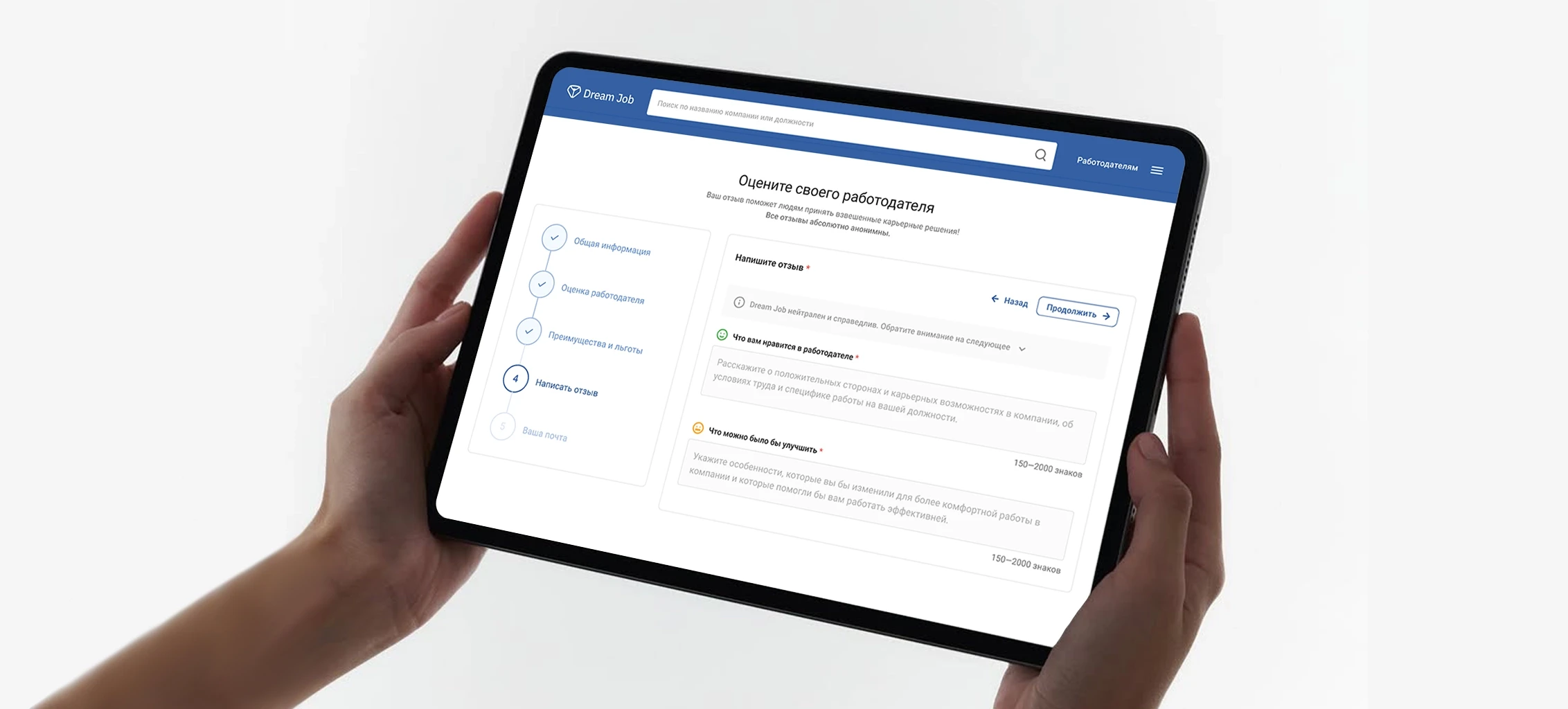
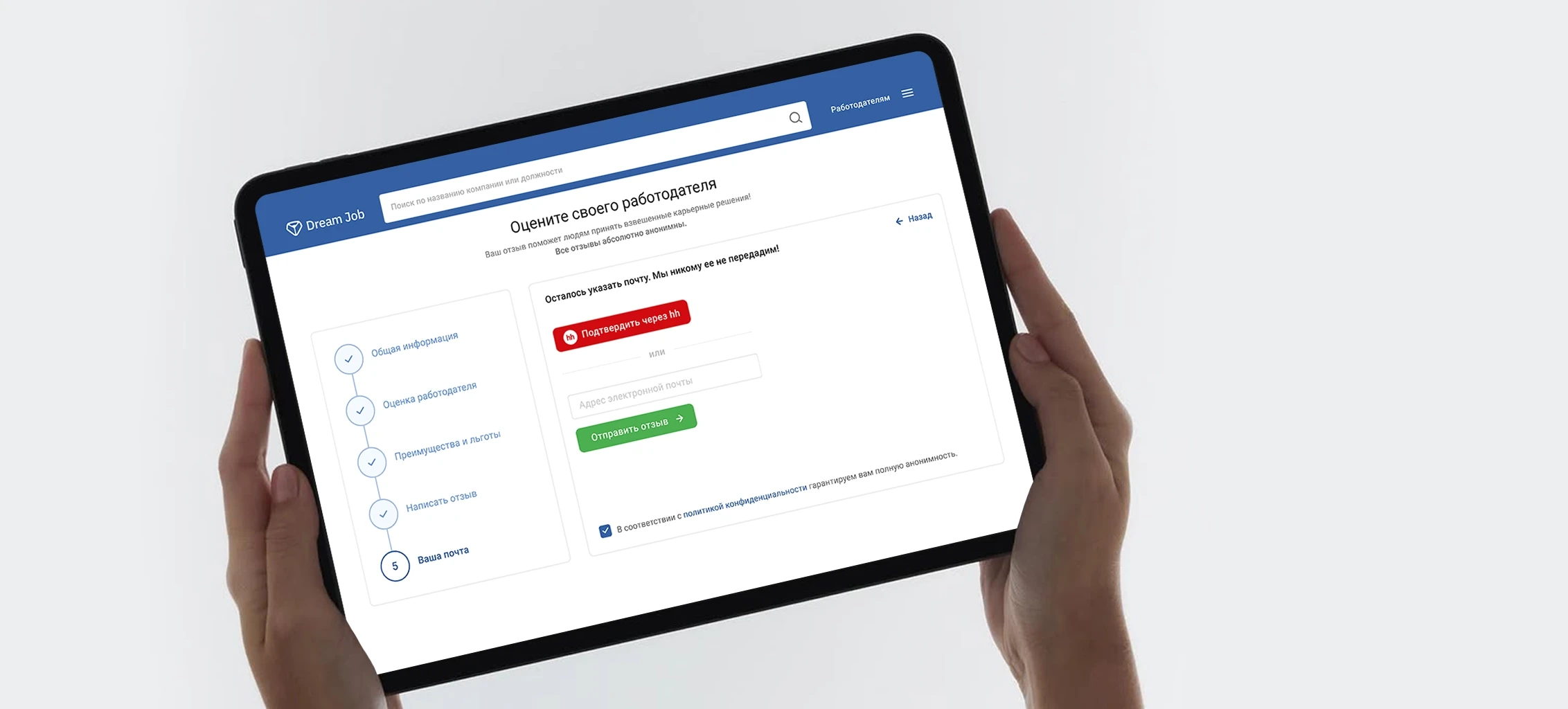
I restructured the submission form into a multi-step process: 1) Overview → 2) Rate Employer → 3) Write a Review → 4) Perks (select from list) → 5) Submit and Register, with a progress indicator for clarity.

I introduced a clear guide on moderation rules, featuring examples of strong reviews and hints like underlined text (e.g., "Avoid offensive words").

We eliminated unnecessary personal data collection, added real-time spellcheck, grammar suggestions, and character counters.

I implemented auto-saving drafts to safeguard against accidental exits.

Implemented Guest-to-Account Conversion

I suggested a review submission without requiring accounts, prompting users to create a post-submission with email capture for seamless onboarding.

I incorporated review status tracking with a visual timeline and a history of past submissions in user accounts, paired with email updates containing edit links.

I added one-click edit/resubmit functionality for rejected reviews to streamline revisions.

We also included actionable tips for improving rejected reviews to guide users effectively.

Expanded Filtering Capabilities

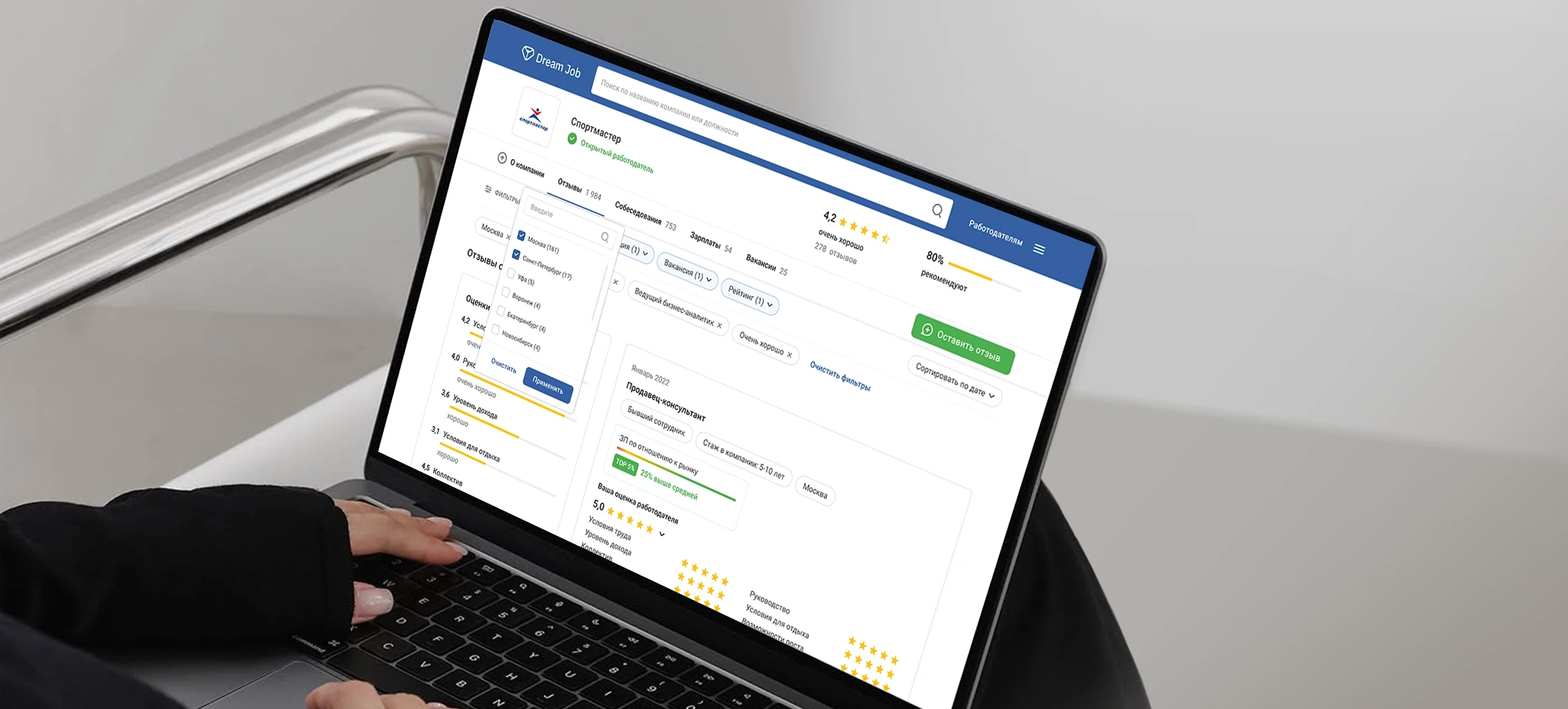
I proposed advanced filters with combinable AND/OR logic criteria (e.g., "Show reviews in [City X] + [Industry Y] + [Job Title Z]").

I suggested preset filter combinations, like "Top Tech Companies in Moscow for Software Engineers," for quick access.

We integrated recent searches and popular filters to simplify navigation.

We implemented smart search with autocomplete, providing predictive suggestions (e.g., typing "Sof..." suggests "Software Engineer").

Solving UI Design Issues

I built a design system to standardize colors, typography, buttons, and spacing, ensuring consistency with a reusable component library. This streamlined development, and simplified onboarding for new developers.

I adopted card-based layouts with a clear visual hierarchy to enhance usability.

I also introduced collapsible sections for secondary actions to reduce clutter and improve focus. These changes streamlined the interface and elevated the overall user experience.

Review Submission Process Improvements

I restructured the submission form into a multi-step process: 1) Overview → 2) Rate Employer → 3) Write a Review → 4) Perks (select from list) → 5) Submit and Register, with a progress indicator for clarity.

I introduced a clear guide on moderation rules, featuring examples of strong reviews and hints like underlined text (e.g., "Avoid offensive words").

We eliminated unnecessary personal data collection, added real-time spellcheck, grammar suggestions, and character counters.

I implemented auto-saving drafts to safeguard against accidental exits.

Implemented Guest-to-Account Conversion

I suggested a review submission without requiring accounts, prompting users to create a post-submission with email capture for seamless onboarding.

I incorporated review status tracking with a visual timeline and a history of past submissions in user accounts, paired with email updates containing edit links.

I added one-click edit/resubmit functionality for rejected reviews to streamline revisions.

We also included actionable tips for improving rejected reviews to guide users effectively.

Expanded Filtering Capabilities

I proposed advanced filters with combinable AND/OR logic criteria (e.g., "Show reviews in [City X] + [Industry Y] + [Job Title Z]").

I suggested preset filter combinations, like "Top Tech Companies in Moscow for Software Engineers," for quick access.

We integrated recent searches and popular filters to simplify navigation.

We implemented smart search with autocomplete, providing predictive suggestions (e.g., typing "Sof..." suggests "Software Engineer").

Solving UI Design Issues

I built a design system to standardize colors, typography, buttons, and spacing, ensuring consistency with a reusable component library. This streamlined development, and simplified onboarding for new developers.

I adopted card-based layouts with a clear visual hierarchy to enhance usability.

I also introduced collapsible sections for secondary actions to reduce clutter and improve focus. These changes streamlined the interface and elevated the overall user experience.

Review Submission Process Improvements

I restructured the submission form into a multi-step process: 1) Overview → 2) Rate Employer → 3) Write a Review → 4) Perks (select from list) → 5) Submit and Register, with a progress indicator for clarity.

I introduced a clear guide on moderation rules, featuring examples of strong reviews and hints like underlined text (e.g., "Avoid offensive words").

We eliminated unnecessary personal data collection, added real-time spellcheck, grammar suggestions, and character counters.

I implemented auto-saving drafts to safeguard against accidental exits.

Implemented Guest-to-Account Conversion

I suggested a review submission without requiring accounts, prompting users to create a post-submission with email capture for seamless onboarding.

I incorporated review status tracking with a visual timeline and a history of past submissions in user accounts, paired with email updates containing edit links.

I added one-click edit/resubmit functionality for rejected reviews to streamline revisions.

We also included actionable tips for improving rejected reviews to guide users effectively.

Expanded Filtering Capabilities

I proposed advanced filters with combinable AND/OR logic criteria (e.g., "Show reviews in [City X] + [Industry Y] + [Job Title Z]").

I suggested preset filter combinations, like "Top Tech Companies in Moscow for Software Engineers," for quick access.

We integrated recent searches and popular filters to simplify navigation.

We implemented smart search with autocomplete, providing predictive suggestions (e.g., typing "Sof..." suggests "Software Engineer").

Solving UI Design Issues

I built a design system to standardize colors, typography, buttons, and spacing, ensuring consistency with a reusable component library. This streamlined development, and simplified onboarding for new developers.

I adopted card-based layouts with a clear visual hierarchy to enhance usability.

I also introduced collapsible sections for secondary actions to reduce clutter and improve focus. These changes streamlined the interface and elevated the overall user experience.

Review Submission Process Improvements

I restructured the submission form into a multi-step process: 1) Overview → 2) Rate Employer → 3) Write a Review → 4) Perks (select from list) → 5) Submit and Register, with a progress indicator for clarity.

I introduced a clear guide on moderation rules, featuring examples of strong reviews and hints like underlined text (e.g., "Avoid offensive words").

We eliminated unnecessary personal data collection, added real-time spellcheck, grammar suggestions, and character counters.

I implemented auto-saving drafts to safeguard against accidental exits.

Implemented Guest-to-Account Conversion

I suggested a review submission without requiring accounts, prompting users to create a post-submission with email capture for seamless onboarding.

I incorporated review status tracking with a visual timeline and a history of past submissions in user accounts, paired with email updates containing edit links.

I added one-click edit/resubmit functionality for rejected reviews to streamline revisions.

We also included actionable tips for improving rejected reviews to guide users effectively.

Expanded Filtering Capabilities

I proposed advanced filters with combinable AND/OR logic criteria (e.g., "Show reviews in [City X] + [Industry Y] + [Job Title Z]").

I suggested preset filter combinations, like "Top Tech Companies in Moscow for Software Engineers," for quick access.

We integrated recent searches and popular filters to simplify navigation.

We implemented smart search with autocomplete, providing predictive suggestions (e.g., typing "Sof..." suggests "Software Engineer").

Solving UI Design Issues

I built a design system to standardize colors, typography, buttons, and spacing, ensuring consistency with a reusable component library. This streamlined development, and simplified onboarding for new developers.

I adopted card-based layouts with a clear visual hierarchy to enhance usability.

I also introduced collapsible sections for secondary actions to reduce clutter and improve focus. These changes streamlined the interface and elevated the overall user experience.

Review Submission Process Improvements

I restructured the submission form into a multi-step process: 1) Overview → 2) Rate Employer → 3) Write a Review → 4) Perks (select from list) → 5) Submit and Register, with a progress indicator for clarity.

I introduced a clear guide on moderation rules, featuring examples of strong reviews and hints like underlined text (e.g., "Avoid offensive words").

We eliminated unnecessary personal data collection, added real-time spellcheck, grammar suggestions, and character counters.

I implemented auto-saving drafts to safeguard against accidental exits.

Implemented Guest-to-Account Conversion

I suggested a review submission without requiring accounts, prompting users to create a post-submission with email capture for seamless onboarding.

I incorporated review status tracking with a visual timeline and a history of past submissions in user accounts, paired with email updates containing edit links.

I added one-click edit/resubmit functionality for rejected reviews to streamline revisions.

We also included actionable tips for improving rejected reviews to guide users effectively.

Expanded Filtering Capabilities

I proposed advanced filters with combinable AND/OR logic criteria (e.g., "Show reviews in [City X] + [Industry Y] + [Job Title Z]").

I suggested preset filter combinations, like "Top Tech Companies in Moscow for Software Engineers," for quick access.

We integrated recent searches and popular filters to simplify navigation.

We implemented smart search with autocomplete, providing predictive suggestions (e.g., typing "Sof..." suggests "Software Engineer").

Solving UI Design Issues

I built a design system to standardize colors, typography, buttons, and spacing, ensuring consistency with a reusable component library. This streamlined development, and simplified onboarding for new developers.

I adopted card-based layouts with a clear visual hierarchy to enhance usability.

I also introduced collapsible sections for secondary actions to reduce clutter and improve focus. These changes streamlined the interface and elevated the overall user experience.

Product Evolution
Rating Job Interviews

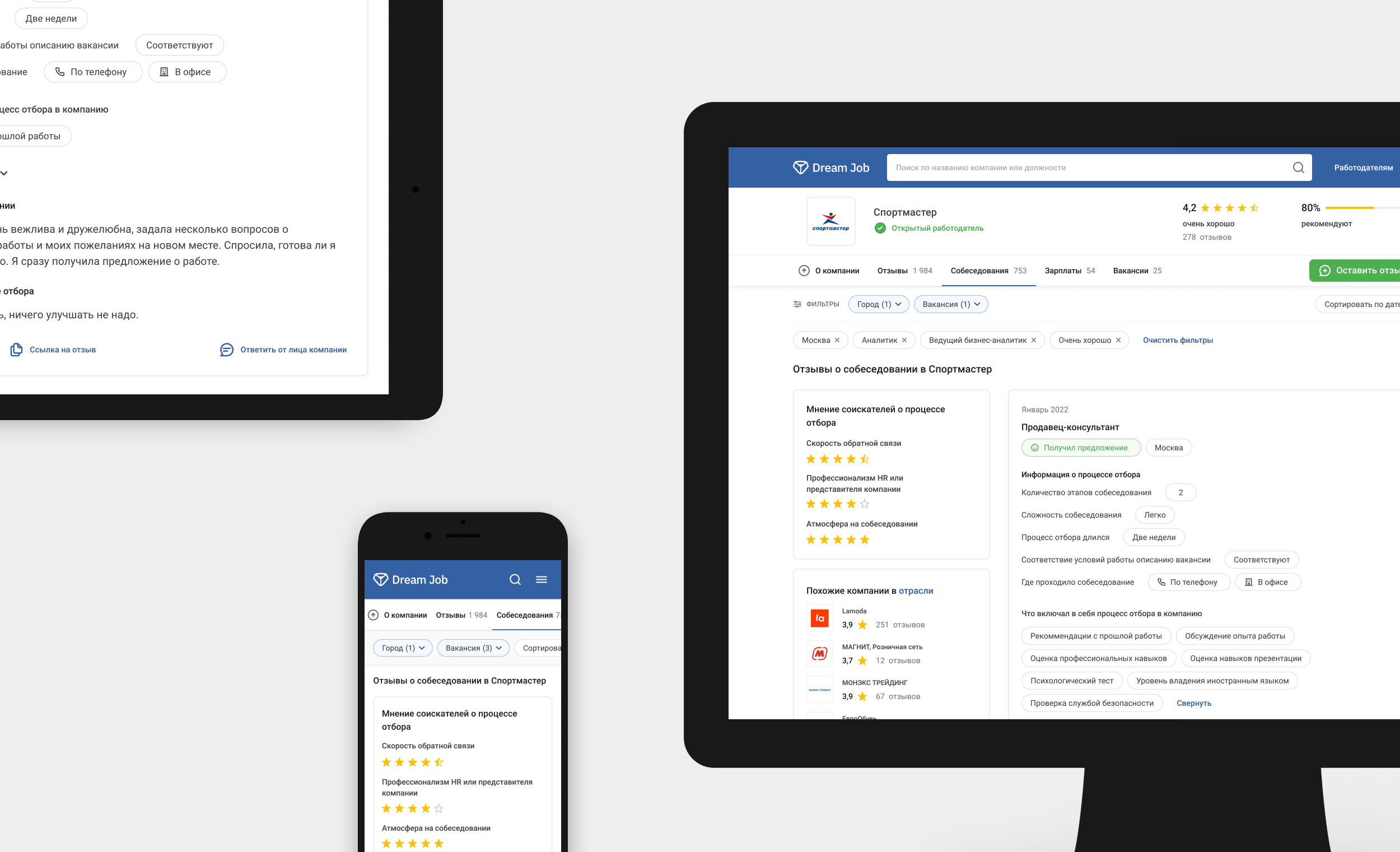
Job seekers want the real scoop on interviews to prep better and see if a company’s hiring vibe matches their expectations. Employers using Dream Job rely on it to keep tabs on their brand and attract top talent, craving feedback to tweak their hiring game. I suggested an “Interview Reviews” tab with filters for role, location, rating, and date, plus a template covering interview style, rounds, question types, interviewer vibes (rated 1–5 stars), and outcomes like getting an offer or being ghosted.

Rating Job Interviews

Job seekers want the real scoop on interviews to prep better and see if a company’s hiring vibe matches their expectations. Employers using Dream Job rely on it to keep tabs on their brand and attract top talent, craving feedback to tweak their hiring game. I suggested an “Interview Reviews” tab with filters for role, location, rating, and date, plus a template covering interview style, rounds, question types, interviewer vibes (rated 1–5 stars), and outcomes like getting an offer or being ghosted.

Outcome

This constant use of design thinking and thorough testing helped us to reach market while reducing costs by using consistent approach and iterations as well as reducing strain due to badly targeted products.

Seventy-five percent of users stated that the proposed solution effectively addressed their needs. Both qualitative and quantitative data indicate that the solution will help users build healthier relationships, reduce stress and anxiety before consulting a psychologist, and make psychology education more accessible to the general public.

This growth has accelerated further in 2024, with en2uition becoming part of the state program Improving Mental Health Access for Low-Income Citizens.

Other

Other

case studies

case studies

case studies

Employee Feedback Platform: Making Reviews Count

Dream Job

Mobile App

Employee Feedback Platform: Making Reviews Count

Dream Job

Mobile App

Employee Feedback Platform: Making Reviews Count

Dream Job

Mobile App

Employee Feedback Platform: Making Reviews Count

Dream Job

Mobile App

Employee Feedback Platform: Making Reviews Count

Dream Job

Mobile App

Streamlining Efficiency: Reducing Document Overload

IT2G

Desktop App

Streamlining Efficiency: Reducing Document Overload

IT2G

Desktop App

Streamlining Efficiency: Reducing Document Overload

IT2G

Desktop App

Streamlining Efficiency: Reducing Document Overload

IT2G

Desktop App

Streamlining Efficiency: Reducing Document Overload

IT2G

Desktop App

Let's talk :)

Julia Lu

© 2024